


What's New

Discover the latest updates, new features and improvements to our platform.

08OCT2026

Guidance for Every Step of Your Journey

The GSkills path experience has been completely redesigned to guide everyone from start to finish. A new overview lets you see completed steps, those yet to discover, and where to pick up.

Within a course or tutorial, your bearings are always within reach. You can check your progress, review the path's flow, and return to the overview.

Once a course is finished, the next step is directly accessible at the bottom of the content. Simply open the next step to stay on track and advance at your own pace.

08OCT2026

Use Cases Your AI Adapts to Your Daily Work

Your AI may already know your projects, documents, and communications. With the GSkills MCP connector, it now has a base of concrete use cases to transform this context into useful ideas for your work.

"With what you know about my work, find three ways to help me this week." The assistant can explore the catalog, choose relevant use cases, and adapt them to your situation. It can take a prompt, clarify necessary information, and personalize it for the project or deliverable you are working on.

Use cases, prompts and links to Gems or skills give your AI concrete starting points for further suggestions. If you have already authorized connections to Gmail, Drive, Chat, or Slack, it can leverage this context to refine its suggestions throughout the conversation.

The profession listed in your GSkills profile already guides recommendations across all surfaces. Your AI can then further personalize them based on your current needs and retrieve your favorites to resume useful use cases.

04OCT2026

Your Gemini resources, easier to discover and retrieve

The GSkills extension now supports the first steps in Gemini with a guided introduction and the option to specify one's profession. Recommendations thus highlight relevant use cases for the individual, both in the extension and in GSkills.

Catalog favorites are now accessible and synchronized in the extension. A use case saved in GSkills can be found in Gemini, and vice versa, to keep useful resources close at hand.

When a Gem is listed in the catalog, its page in Gemini also displays the associated GSkills information. The user can find out what it is for and the available tips for using it effectively, right when starting their conversation.

GSkills · Chrome Web Store ↗

30SEP2026

Your AI can now help you administer GSkills

Prepare an adoption report, find users to support, or organize your company groups… The GSkills MCP connector now allows administrators to work on their space from a compatible AI assistant.

Gemini, ChatGPT, Claude… The connection goes through MCP, a standard supported by most major AI assistants. Simply choose an assistant that allows connecting an MCP server.

The assistant can consult statistics and perform management actions accessible to the administrator, particularly concerning users, their access, and the entities that group teams. You can start with a question, refine your request, and then entrust it with the desired action.

The connection relies on the administrator's GSkills account and retains their access scope. A manager limited to certain teams remains limited to those teams, even when using their assistant.

21SEP2026

One link to share Gemini use cases across your international teams

A useful prompt in one team can spark ideas in all others. GSkills now allows you to share a link to a Gemini use case that opens in the recipient's language. With over 40 supported languages, your international teams can share resources without having to search for a different link for each language.

Use cases, ready-to-adapt prompts, links to Gems or skills... A resource can circulate in a discussion, training material, or internal communication. You can also share the catalog to invite everyone to explore the resources offered by the company.

Everyone then finds recommendations adapted to the profession specified in their profile, both in GSkills and in the Chrome extension. Good ideas become easier to discover, transmit, and implement.

18SEP2026

Explore your data with the AI agent

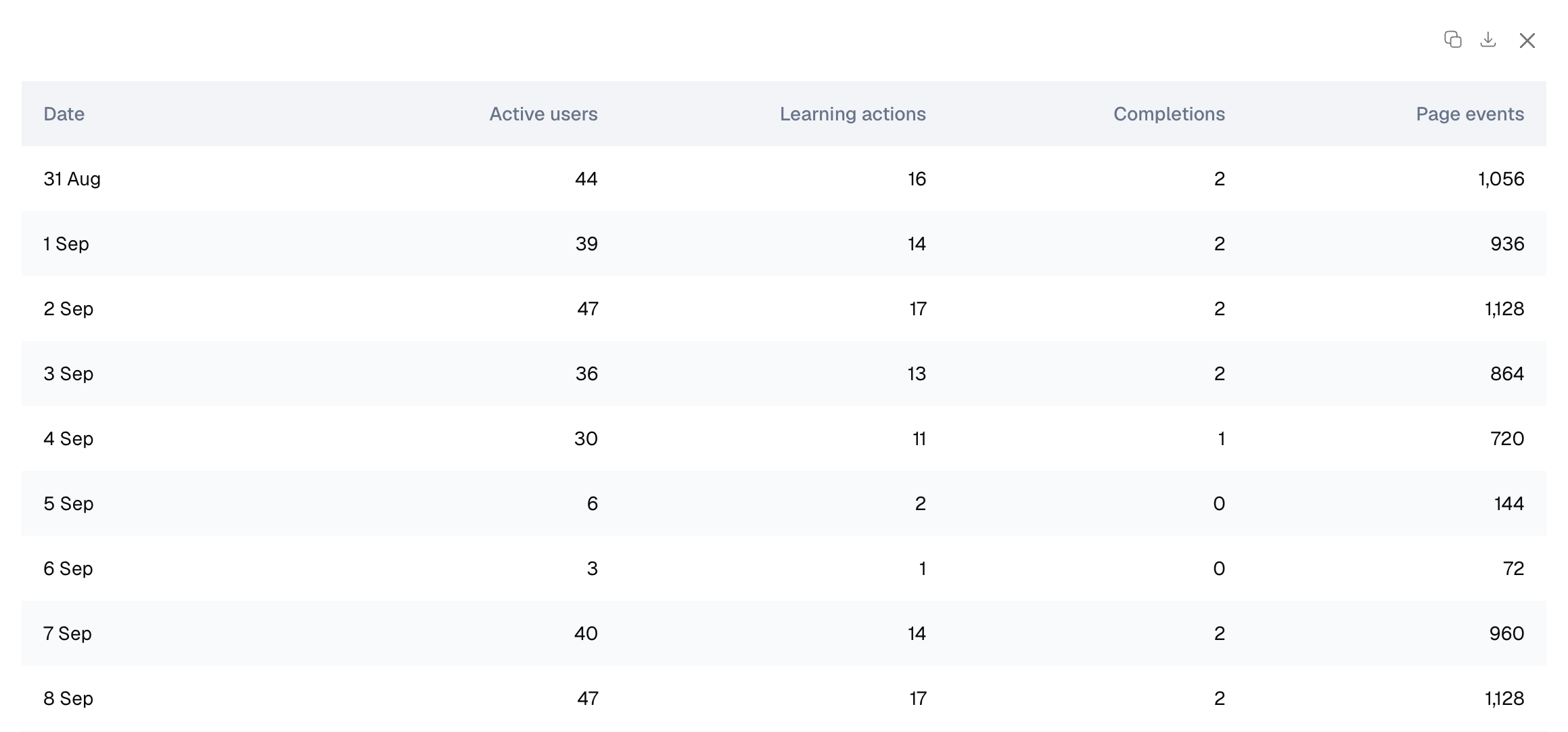
The AI agent built into the GSkills admin area lets you explore your organization’s data in natural language. Ask a question to compare periods, track activity or identify changes that deserve your attention.

Results can be presented in a table. Use the download button to export it as a CSV file and continue your analysis in a spreadsheet or prepare a report.

You can also ask for a visualization to understand a trend more clearly. Charts can be copied as images and added to a presentation or report.

02SEP2026

Your favorite Gemini use cases, close at hand

GSkills now lets everyone save their favorite Gemini use cases in a personal selection.

An example to try, a prompt to reuse or a Gem that helps with everyday work can be found easily, without browsing the entire catalog again.

29AUG2026

Take your Gemini use cases from ideas to everyday practice

Your company’s resources are now within reach in Gemini. With the GSkills Chrome extension, employees can find use cases, ready-to-adapt prompts, and links to Gems or skills without switching tabs.

Your company stays in control of its catalog in a Google Sheet within its own environment. The resources it chooses to share are available as teams prepare their requests. Just as in GSkills, personalized recommendations highlight relevant use cases based on the profession entered in each profile.

Administrators can also track which catalog resources are viewed and which prompts from the catalog are sent in Gemini. These signals help them understand what teams put into practice and decide where support would be useful.

Install GSkills for Chrome

28JUL2026

Bring your company’s expertise into Gemini

Ready-to-adapt prompts, practical use cases, and links to Gems and skills help teams apply AI to their work. Administrators now have a dedicated space to manage their company’s Gemini catalog.

Your company manages its resources in a Google Sheet within its own environment and stays in control of what it shares. In GSkills, administrators can update the catalog, manage languages, and choose how teams access it, including through the Chrome extension.

Personalized recommendations highlight use cases that suit the profession entered in each person’s profile. Employees can more easily find useful ideas, both in GSkills and in Gemini through the extension.

22JUL2026

Invite your teams to explore content or follow a learning path

Introducing a new tool or helping a team develop a skill? GSkills now lets administrators invite the right people to explore selected content or follow a learning path. Turn your training resources into a focused next step for your teams.

Administrators can select existing teams in GSkills or choose individual recipients, then personalize the message. Each person receives an invitation in their language with a direct link to the content.

03JUL2026

Build your Gemini catalog around your teams’ needs

Which examples would help your teams get more from Gemini? Administrators can now see frequent searches and searches that return no results in the catalog.

These requests complement statistics on resources already viewed or used. They help identify which use cases, prompts, Gems, or skills to add next. Your company can update its catalog in Google Sheets based on the needs employees express.

New resources join a catalog with recommendations tailored to the profession entered in each person’s profile, in both GSkills and the Chrome extension. Your teams’ requests help make the catalog more useful for everyone.

05JUN2026

GSkills is available on Google Workspace Marketplace

GSkills is now listed on Google Workspace Marketplace, alongside the tools used daily by organizations in their Google environment.

21MAY2026

A new icon for GSkills

GSkills adopts a new, more readable and modern icon.

It accompanies the future rebranding of GSkills and makes the application more recognizable in everyday tools.

27APR2026

GSkills is available in Canadian French

GSkills is now available in Canadian French to offer a more tailored experience to Francophone organizations in Canada.

21APR2026

GSkills supports Okta

GSkills can now integrate with environments that use Okta for login.

Users retain their access habits, within a framework already known by their organization.

15APR2026

🚀 Major content update

An important update has been deployed to enrich content and improve the upskilling experience on GSkills.

🧰 Updated applications

Content has been reviewed and enriched for the following applications:

  • Gmail
  • Google Calendar
  • Google Chat
  • Google Drive
  • Google Chrome (new entry)
  • Google Sheets
  • Google Slides (Added expert level content)
  • Google Docs
  • Google Forms
  • NotebookLM (if AI is enabled)
  • Workspace Studio (added if not present in your instance & if AI enabled)

🧭 New courses (Premium)

Two new courses are available to structure user progression:

  • The foundations of digital collaboration (Chrome, Gmail, Chat, Calendar, Meet, Drive)*
  • Optional quiz “transformation leader”
  • Discover your collaborative editing tools (Docs, Sheets, Slides, Forms)

Complementary video capsules

📚 Enrichment of the knowledge base (Premium)

  • Added numerous video capsules in French on:
  • Added +30 written tutorials dedicated to AI
  • Coming soon:

🧠 Quiz Update

  • Creation and updating of multiple quizzes
  • Users retain their existing statistics
  • Quizzes can be retaken to re-evaluate oneself
  • Ability to improve one's score

🔜 Upcoming updates

A new wave of updates is planned soon:

  • Google Meet
  • Google Keep (with Tasks integration)
  • Google Contacts
  • Google Sites
  • Google Data Studio (depending on instances)

ℹ️ Please note

  • Courses and the enriched knowledge base are available depending on your instance's offering level
  • Some features may vary depending on AI activation or available modules
27FEB2026

Redesign of the statistics system + OU Administrator

We have completely redesigned our statistics module to offer you a finer and more actionable view of GSkills usage. Here are the major new features:

Adoption-focused management

Forget simple attendance figures. Our new analytics focus on what really matters:

  • Completion rate of training courses.
  • Number of active users.
  • Adoption by category to identify the most popular skills.

Fluid Navigation by Tabs

Directly access the information you need thanks to an interface organized by themes: Adoption, Gamification, Traffic, or Comparisons.

Micro-exports (CSV in 1 click)

Need to know who is behind a number? Locate the values underlined with dotted lines. A simple hover displays the users concerned, and a click allows you to export this specific micro-dataset in CSV format.

Your new AI Assistant

Data analysis becomes conversational. Ask our AI your questions in natural language:

  • It queries your instance.
  • It generates custom dashboards on demand.
  • Export the results instantly to CSV or Excel.

🔑 New role: OU (Organizational Unit) Administrator

To offer greater flexibility to large organizations, we are introducing the role of OU Administrator.

It is now possible to delegate platform management in a granular manner. A user can be appointed administrator of one or more specific organizational units. He will thus have control over his dedicated scope, without accessing the global configuration of the instance.

15JAN2026

GSkills update log (changelog)

This update log is now integrated directly into GSkills.

You are reading it right here. This is the dedicated place to follow the evolution of the platform, understand what changes and see what progresses over time.

The objective is to provide visibility on the progress of GSkills and to make product developments clearer and more accessible.

This log will be updated regularly to reflect the improvements, adjustments and new features of the platform.

2026
Where it all began